Installation
You can use Scalafmt from your editor, build tool or terminal.
Configuration
You'll need a .scalafmt.conf file to use Scalafmt.
The Configuration documentation includes detailed
documentation on the available options.
IntelliJ
The Scala plugin compatible with recent versions of IntelliJ IDEA has built-in support for Scalafmt (see Note below). DO NOT install the deprecated Scalafmt plugin unless you have an older version of Intellij.
When opening a
project that contains a .scalafmt.conf file, you will be
prompted to use it:

Choose the scalafmt formatter and IntelliJ's Reformat Code action will then
use Scalafmt when formatting files. See below for shortcuts.
Note: IntelliJ 2019.1 or later is required in order for the Scala plugin
to support Scalafmt and the dynamic version set in your .scalafmt.conf. If
you must use an older version, see the FAQ for an alternative.
Format current file
- Opt + Cmd + L (macOS)
- Ctrl + Alt + L (other)
To re-configure the shortcut:
- Open
Preferences > Keymap - Search for "Reformat Code"
Range formatting
Scalafmt is primarily designed to operate on entire text files—formatting selected ranges of code may produce undesirable results. For this reason, IntelliJ uses its own formatter for ranges by default. It is not recommended to change this, and is instead recommended to format files when saving.
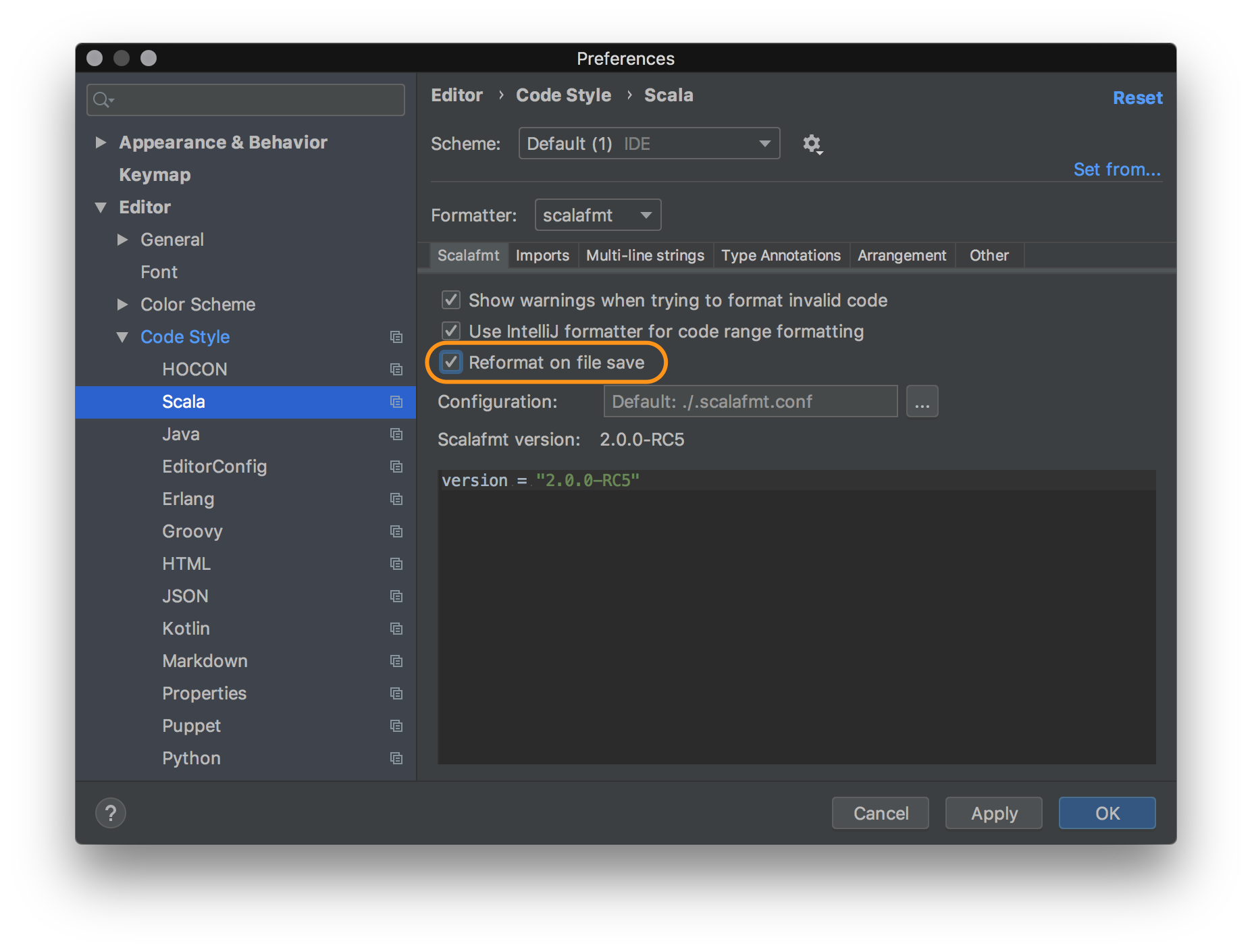
Format on save
- for the current project (recommended):
Preferences > Editor > Code Style > Scala - for all new projects:
File > Other Settings > Preferences for New Projects… > Editor > Code Style > Scala
Resume using IntelliJ formatter
To reset the formatter to IntelliJ for an existing project that uses the Scalafmt formatter:
- Open
Preferences > Editor > Code Style > Scala - Switch "Formatter" value to "IntelliJ"
It is not possible to reset this setting for all existing projects.
VS Code
You can use the Metals language server to format code with Scalafmt in VS Code. For more details, refer to the Metals documentation.
Vim
You can use the Metals language server to format code with Scalafmt in Vim and NeoVim. For more details, refer to the Metals documentation.
Emacs
You can use the Metals language server to format code with Scalafmt in Emacs. For more details, refer to the Metals documentation.
The externally maintained format-all extension to Emacs also supports scalafmt as one of its formatters.
Sublime Text
You can use the Metals language server to format code with Scalafmt in Sublime Text. For more details, refer to the Metals documentation.
Eclipse
You can use the Metals language server to format code with Scalafmt in Eclipse. For more details, refer to the Metals documentation.
Metals
Metals automatically uses Scalafmt to respond
to formatting requests from the editor, according to the configuration defined
in .scalafmt.conf.
In most editors, if you there is no .scalafmt.conf, upon receiving the first
format request Metals will create the .scalafmt.conf file for you.
You can find more information on triggering a format request for individual editors in their respective parts of the Metals site.
sbt
NB: keep in mind that versions of scalafmt-core and sbt-scalafmt are released
independently, their versions do not align. The version of scalafmt-core is defined
in the .scalafmt.conf configuration file and downloaded dynamically.
// In project/plugins.sbt. Note, does not support sbt 0.13, only sbt 1.x.
addSbtPlugin("org.scalameta" % "sbt-scalafmt" % SBT_PLUGIN_VERSION)
Latest published version of the sbt plugin:

To configure the scalafmt version add the following line into .scalafmt.conf:
version = 3.11.5
Task keys
myproject/scalafmt: Format main sources ofmyprojectprojectmyproject/Test/scalafmt: Format test sources ofmyprojectprojectscalafmtCheck: Check if the scala sources under the project have been formatted.scalafmtSbt: Format*.sbtandproject/**/*.scalafiles.scalafmtSbtCheck: Check if the files have been formatted byscalafmtSbt.scalafmtOnly <file>...: Format specified files listed.scalafmtAllorscalafmtCheckAll: Execute thescalafmtorscalafmtChecktask for all configurations in which it is enabled (since v2.0.0-RC5)- [since v2.6.2]
myproject/scalafmtRepoormyproject/scalafmtCheckRepo: Format (or check) every file under the project's base directory the way the scalafmt CLI would — git-tracked files whenproject.git = true, otherwise a filesystem walk (skippingtargetand hidden directories) — rather than only sbt's configured source directories. Use this when files live outside the standard source layout (e.g.scripts/) and the per-configuration tasks miss them. Run at the build root to cover the whole build; uses that project'sscalafmtConfig.
Settings
scalafmtConfig: File: The location of the.scalafmt.confconfiguration file. Defaults to the.scalafmt.conffile at the root of the project.scalafmtOnCompile: Boolean: Defines if the sbt-scalafmt should run scalafmt on compile. Defaultfalse.- ⚠️ This option is discouraged since it messes up undo buffers in the editor and it slows down compilation. It is recommended to use "format on save" in the editor instead.
- [since v2.6.2]
scalafmtSbtOnLoad: String(default"off"): process*.sbtandproject/*.scalafiles on every sbt(re)load— the point at which build files are recompiled — so they stay formatted without a separatescalafmtSbtstep:"off": do nothing (default)"run": format them (runsscalafmtSbt); if a reformat occurs, sbt reloads once more, converging"warn": check them (runsscalafmtSbtCheck) and log a warning if any need formatting, without failing the load- set it build-wide, e.g.
ThisBuild / scalafmtSbtOnLoad := "run"
- [since v2.4.5]
scalafmtFilter: String(default""): optionally limits the set of files considered for formatting:diff-dirty: only the files modified in the git working tree (git status)diff-ref=<spec>: only the tracked files modified since<spec>(git diff)- [since v2.4.6]
none: no restrictions - otherwise if
project.git = true(.scalafmt.conf): only files tracked by git (git ls-tree) - otherwise, no restrictions
- [since v2.4.3]
scalafmtDetailedError: Boolean: if set, when handling a specific error (whether logging or throwing an exception), include the stacktrace as well - [since v2.4.5]
scalafmtLogOnEachError: Boolean: if set, plugin will log errors - [since v2.4.5]
scalafmtFailOnErrors: Boolean: if set, plugin will fail on errors- depending on
scalafmtLogOnEachError, fail on the first error or only at the end
- depending on
- [since v2.4.6]
scalafmtPrintDiff: Boolean: if set,checkwill display the differences for incorrectly formatted files - [since v2.6.2]
scalafmtParallelism: Int(default1): maximum number of threads used to format files within a single task (i.e. for one project/configuration). The default1formats sequentially, as before; higher values format that task's files concurrently. See Parallelism below.
Enable IntegrationTest
Unnecessary since v2.4.4.
The sbt plugin is enabled by default for the Test and Compile configurations.
Use scalafmtConfigSettings to enable the plugin for integration tests and then
use it:scalafmt to format.
inConfig(IntegrationTest)(org.scalafmt.sbt.ScalafmtPlugin.scalafmtConfigSettings)
Share configuration between builds
To share configuration across different sbt builds, create a custom sbt plugin
that generates .scalafmt-common.conf on build reload, then include the
generated file from .scalafmt.conf
// project/MyScalafmtPlugin.scala
import sbt._
object MyScalafmtPlugin extends AutoPlugin {
  override def trigger = allRequirements
  override def requires = plugins.JvmPlugin
  override def buildSettings: Seq[Def.Setting[_]] = {
    SettingKey[Unit]("scalafmtGenerateConfig") :=
      IO.write(
        // writes to file once when build is loaded
        file(".scalafmt-common.conf"),
        "maxColumn = 100".stripMargin.getBytes("UTF-8")
      )
  }
}
// .scalafmt.conf
include ".scalafmt-common.conf"
Parallelism
Scalafmt formatting happens at two levels, controlled independently.
Across tasks (subprojects/configurations)
sbt runs the scalafmt/scalafmtCheck tasks of different projects and
configurations in parallel. Each such task is tagged with Tags.CPU (so sbt
won't run more of them at once than there are CPUs) and with a dedicated
scalafmt tag. You can further cap how many run simultaneously in your
build.sbt:
import org.scalafmt.sbt.ConcurrentRestrictionTags

Global / concurrentRestrictions += Tags.limit(org.scalafmt.sbt.ConcurrentRestrictionTags.Scalafmt, 4)
Within a task (across files)
[since v2.6.2] By default a single task formats its files one at a time on one
thread. Set scalafmtParallelism above 1 to format that task's files
concurrently on a bounded thread pool:
Global / scalafmtParallelism := 4 // or scope it per project/configuration
This helps most when one task has many files — a large single-module project,
or scalafmtCheck in CI on a clean checkout (where the incremental cache is
empty and every file is processed).
Note that a task still counts as a single Tags.CPU to sbt's scheduler while
using up to scalafmtParallelism threads, so on a build that already saturates
all cores across many subprojects a high value can oversubscribe; that is why
the default is 1. Also, with scalafmtParallelism > 1 and the default
scalafmtFailOnErrors = true, a task that hits an unparseable file writes none
of its files (the error is raised before any are written), rather than writing
the files preceding the failure.
CLI
The recommended way to install the scalafmt command line tool is with Coursier.
Coursier
install
If you're using a recent version of coursier which supports direct
installation
of packages, the simplest approach is by running
cs install scalafmt
scalafmt --version # should be 3.11.5
standalone
Alternatively, you can create a complete standalone executable (40+ MB in 2022) with:
coursier bootstrap org.scalameta:scalafmt-cli_2.13:3.11.5 \
  -r sonatype:snapshots --main org.scalafmt.cli.Cli \
  --standalone \
  -o scalafmt
./scalafmt --version # should be 3.11.5
slim
Finally, you can choose to obtain a slim bootstrap script (100+ KB in 2022) instead with:
coursier bootstrap org.scalameta:scalafmt-cli_2.13:3.11.5 \
  -r sonatype:snapshots --main org.scalafmt.cli.Cli \
  -o scalafmt
./scalafmt --version # should be 3.11.5
If a version is defined in .scalafmt.conf, the CLI binary will honor it
by automatically resolving and downloading the corresponding artifacts if it
does not match its own version. Otherwise, it is recommended to put this
bootstrap script in your code repository to make sure everyone on your team,
as well as CI, uses the same scalafmt version.
To configure which files to format, see project.
To customize the JVM options, use the Coursier option --java-opt, more info
with
coursier bootstrap --help | grep -A 1 "\-\-java-opt"
Pre-release
Our CI publishes a pre-release version of scalafmt to Sonatype Snapshots on every merge into master. To use a pre-release, replace 3.11.5 with the version here:

If you use coursier to install a pre-release, be sure to include the flag
-r sonatype:snapshots so that the artifact can be resolved.
If you use sbt to install a pre-release, be sure to add the following setting:
resolvers += Resolver.sonatypeRepo("snapshots")
Native binaries
It's possible to download pre-built Scala Native binaries with instant startup and fast performance for short-lived Scalafmt runs using Scala CLI and Scala CLI Setup Action.
scala-cli format
Scala CLI will download the native binary and run it with the same arguments as the scalafmt command.
Nailgun
Nailgun is recommended if you want to integrate scalafmt with a text editor like vim/Emacs/Atom/Sublime/VS Code.
- Make sure you have a nailgun client installed. For example with
brew install nailgun. - Create a standalone executable in
/usr/local/bin/scalafmt_ngwith (sudo if necessary)
coursier bootstrap --standalone org.scalameta:scalafmt-cli_2.13:3.11.5 \
  -r sonatype:snapshots -f --main com.martiansoftware.nailgun.NGServer \
  -o /usr/local/bin/scalafmt_ng
scalafmt_ng & // start nailgun in background
ng ng-alias scalafmt org.scalafmt.cli.Cli
ng scalafmt --version # should be 3.11.5
Nailgun keeps scalafmt running on a local server to avoid the JVM startup penalty and also so scalafmt can benefit from JIT. This makes scalafmt up to 10x faster when formatting a single file from the CLI. The downside to Nailgun is that the setup is complicated and the long-running server needs to be restarted once in awhile.
Homebrew
The recommended way to install the scalafmt command line tool is with Coursier, itself available via Homebrew.
brew install coursier/formulas/coursier
coursier install scalafmt
scalafmt --version // should be 3.11.5
If necessary, make sure to follow the Coursier instructions for updating
$PATH so that the scalafmt binary becomes available in your terminal.
Arch Linux
You can install scalafmt for Arch Linux from AUR. There is the scalafmt-native-bin package that installs scalafmt binary built with GraalVM. GraalVM native binary provides instant startup without Nailgun.
yaourt -S scalafmt-native-bin
scalafmt --version // should be 3.11.5
--help
build commit: e1f0c2dcdcc5649c424264ca5b88b6b0322ae30a
build time: Thu Oct 15 01:55:29 UTC 2026
scalafmt 3.11.5+118-e1f0c2dc-SNAPSHOT
Usage: scalafmt [options] [<file>...]

  -h, --help               prints this usage text
  -v, --version            print version
  <file>...                file, or directory (in which all *.scala files are to be formatted);
                           if starts with '@', refers to path listing files to be formatted
                           (with "@-" referring to standard input as a special case)
  --stdout                 write formatted files to stdout
  --exclude <value>        file or directory, when missing all *.scala files are formatted.
  --respect-project-filters
                           use project filters even when specific files to format are provided
  -c, --config <value>     a file path to .scalafmt.conf.
  --config-str <value>     configuration defined as a string
  --stdin                  read from stdin and print to stdout
  --no-stderr              don't use strerr for messages, output to stdout
  --assume-filename <value>
                           when using --stdin, use --assume-filename to hint to scalafmt that the input is an .sbt file.
  --reportError            exit with status 1 if any mis-formatted code found.
  --test                   test for mis-formatted code only, exits with status 1 on failure.
  --check                  test for mis-formatted code only, exits with status 1 on first failure.
  --mode <value>           Sets the files to be formatted fetching mode.
                           Options:
                              diff-ref=xxx: format files listed in `git diff` against gitref `xxx`
                              diff-base: format files changed since this branch forked from its upstream (@{upstream})
                              diff: format files listed in `git diff` against gitref `master`
                              changed: format files listed in `git status` (latest changes against previous commit)
                              any: format any files found in current directory
                              anygit: format any git-tracked files found in current directory
  --diff                   Format files listed in `git diff` against master.
                           Deprecated: use --mode diff instead
  --diff-branch <value>    Format files listed in `git diff` against given git ref.
                           Deprecated: use --mode diff-ref=<ref> instead
  --build-info             prints build information
  --quiet                  suppress progress and diagnostics (but not requested output).
  --debug                  print out diagnostics to console.
  --no-progress-bar        disable progress bar
  --non-interactive        append progress rather than overlay, useful in CI
  --list                   list files that are different from scalafmt formatting
  --async-format           Use a dedicated thread pool for formatting, rather than
                           continuing after read completes, thus separating I/O-bound
                           input and CPU-bound formatting thread pools.
  --diff-config            Compare original configuration with the effective one
                           (after resolving aliases or renaming deprecated parameters).
Examples:
scalafmt # Format all files in the current project, configuration is determined in this order:
         # 1. .scalafmt.conf file in current directory
         # 2. .scalafmt.conf inside root directory of current git repo
         # 3. no configuration, default style
scalafmt --test # throw exception on mis-formatted files, won't write to files.
scalafmt --mode diff # Format all files that were edited in git diff against master branch.
scalafmt --mode changed # Format files listed in `git status` (latest changes against previous commit.
scalafmt --diff-branch 2.x # same as --diff, except against branch 2.x
scalafmt --stdin # read from stdin (doesn't imply --stdout)
scalafmt --stdin --assume-filename foo.sbt < foo.sbt # required when using --stdin to format .sbt files.
scalafmt Code1.scala A.scala       # write formatted contents to file.
scalafmt --stdout Code.scala       # print formatted contents to stdout.
scalafmt --exclude target          # format all files in directory excluding target
scalafmt --config .scalafmt.conf   # read custom style from file.
scalafmt --config-str "style=IntelliJ" # define custom style as a flag, must be quoted.
Please file bugs to https://github.com/scalameta/scalafmt/issues
Using custom repositories with CLI
Under the hood, scalafmt uses the scalafmt-dynamic library and, in turn,
coursier, to download the version (of scalafmt-core) specified in
.scalafmt.conf file.
By default, coursier will download from a few standard repositories (including
sonatype, both public and snapshot). However, if you'd like to use instead some
custom repositories within your environment, please specify them using the
COURSIER_REPOSITORIES environment variable.
If you are using
sbt-scalafmt, it will also automatically provide to coursier sbt resolvers and sbt credentials.
Repository credentials
Additionally, if your repositories require credentials, please specify them
in the COURSIER_CREDENTIALS
environment variable.
Keep in mind that coursier credential format is not the same as, say, sbt,
and since multiple entries are allowed and expected, each requires a unique
prefix of your choosing.
Others have also reported needing to include in their credentials settings such as
<prefix>.pass-on-redirect=true
<prefix>.auto=true
Gradle
It is possible to use scalafmt in gradle with the following externally maintained plugins:
Maven
It is possible to use scalafmt in Maven with the following externally maintained plugin:
Mill
Mill has scalafmt support built-in:
Standalone library
Use the scalafmt-dynamic module to integrate with Scalafmt.
libraryDependencies += "org.scalameta" %% "scalafmt-dynamic" % "3.11.5"
First, create an instance of Scalafmt and get paths for the file to format
along with it's configuration file.
import java.nio.file._
import org.scalafmt.interfaces.Scalafmt
val scalafmt = Scalafmt.create(this.getClass.getClassLoader)
val config = Paths.get(".scalafmt.conf")
val file = Paths.get("Main.scala")
Use the format method to format a string with the given config and filename.
println(scalafmt.format(config, file, "object A  {  }"))
// object A {}
//
Binary compatibility guarantees
Stable public APIs:
org.scalafmt.interfaces(recommended): pure Java APIs with no external dependencies. Can be loaded via thescalafmt-dynamicmodule.org.scalafmt.Scalafmt(discouraged): old public API that is stable and will remain stable but has several limitations.- no support for
versionin.scalafmt.conf - does not respect
project.excludeFiltersin.scalafmt.conf - doesn't automatically handle
*.sbtand*.scfiles - no caching of
.scalafmt.conf
- no support for
Internal APIs that are subject to binary breaking changes in any release:
org.scalafmt.dynamic: private implementation ofscalafmt-interfaces. These classes can be used via the static methodorg.scalafmt.interfaces.Scalafmt.create(ClassLoader).org.scalafmt.config: case classes for.scalafmt.confconfiguration that that are only intended for internal usage.org.scalafmt.cli: private implementation of the command-line interface.
*.sbt and *.sc files
It's possible to format *.sbt and *.sc files.
println(scalafmt.format(config, Paths.get("build.sbt"), "lazy    val   x =   project"))
// lazy val x = project
//
println(scalafmt.format(config, Paths.get("build.sc"), "def  main(  ) = println()"))
// def main() = println()
//
The scalafmt instance automatically picks the correct parser depending on the
provided filename.
Version handling
By default, the scalafmt instance automatically downloads the Scalafmt version
declared in .scalafmt.conf. If the version setting is not declared, the
original file contents are returned unchanged and an error is reported with
instructions how to fix the problem.
Error reporting
By default, Scalafmt errors are reported to System.err. Extend
org.scalafmt.interfaces.ScalafmtReporter to customize error reporting to
handle parse and config errors.
Here is an example how to extend ScalafmtReporter.
File: ConsoleScalafmtReporter.scala
package org.scalafmt.dynamic

import org.scalafmt.interfaces.ScalafmtReporter

import java.io.{OutputStreamWriter, PrintStream, PrintWriter}
import java.nio.file.Path

object ConsoleScalafmtReporter extends ConsoleScalafmtReporter(System.err)

class ConsoleScalafmtReporter(out: PrintStream) extends ScalafmtReporter {
  override def error(file: Path, e: Throwable): Unit = {
    out.print(s"error: $file: ")
    trimStacktrace(e)
    e.printStackTrace(out)
  }

  override def error(path: Path, message: String): Unit = out
    .println(s"error: $path: $message")

  override def excluded(filename: Path): Unit = out
    .println(s"file excluded: $filename")

  override def parsedConfig(config: Path, scalafmtVersion: String): Unit = out
    .println(s"parsed config (v$scalafmtVersion): $config")

  override def downloadWriter(): PrintWriter = new PrintWriter(out)

  override def downloadOutputStreamWriter(): OutputStreamWriter =
    new OutputStreamWriter(out)

  protected def trimStacktrace(e: Throwable): Unit = ()
}
Use withReporter(reporter) to pass in your custom reporter.
import java.io._
import org.scalafmt.dynamic._
val myOut = new ByteArrayOutputStream()
val myReporter = new ConsoleScalafmtReporter(new PrintStream(myOut))
val customReporterScalafmt = scalafmt.withReporter(myReporter)
Project filters
By default, scalafmt only formats files that match the
project.{excludeFilters,includeFilters} settings in .scalafmt.conf. Use
withRespectExcludeFilters(false) to disable this behavior.
val scalafmtThatIgnoresProjectSettings = scalafmt.withRespectProjectFilters(false)
Alternate repositories and credentials
scalafmt uses some default repositories to download the version specified in
.scalafmt.conf; these repositories could be hardcoded or potentially specified
via the environment variables.
In order to specify explicit repositories as well, one could use
val scalafmtWithRepos = scalafmt.withMavenRepositories(
  "https://repo-1/snapshots",
  "https://repo-2/public"
)
In addition, if some of the default or custom repositories require access credentials, they could be specified via
import org.scalafmt.interfaces._

val scalafmtWithCreds = scalafmtWithRepos match {
  case x: RepositoryCredential.ScalafmtExtension =>
    x.withRepositoryCredentials(
      new RepositoryCredential("repo-1", "username", "password")
    )
  case x => x
}
This capability was added to the public interface as an extension method, accessible via a separate sub-interface.
Clearing resources
Use the clear() method to clear up resources of the scalafmt instance.
scalafmt.clear()
Calling from Java
It's possible to call Scalafmt from Java without depending directly on Scala libraries.
First, depend on the scalafmt-interfaces module, which is a pure Java library
with no external dependencies.
<dependency>
    <groupId>org.scalameta</groupId>
    <artifactId>scalafmt-interfaces</artifactId>
    <version>3.11.5</version>
</dependency>
Next, obtain a classloader with the scalafmt-dynamic_2.12 classpath.
import java.net.URLClassLoader;
// this package contains only Java APIs.
import org.scalafmt.interfaces.*;

// ClassLoader that shares only org.scalafmt.interfaces from this classloader.
ClassLoader sharedParent = new ScalafmtClassLoader(this.getClass.getClassLoader)

// Jars to org.scalameta:scalafmt-dynamic_2.12:3.11.5 classpath. Obtain
// these from your build tool or programmatically with ivy/coursier.
URL[] jars = // ...
ClassLoader scalafmtDynamic = new URLClassLoader(jars, sharedParent)
Finally, create an instance of Scalafmt with the scalafmt-dynamic
classloader.
Scalafmt scalafmt = Scalafmt.create(scalafmtDynamic)
String formatted = scalafmt.format(config, file, "object A   { }")